超过 15 分钟,提示预留已过期?Took more than 15 minutes and the reservation expired?
卡密没有被用掉。回到首页重新输入卡密,从第 1 步开始即可。The card key was not used. Go back to the home page, enter it again and start from step 1.
GitHub 兑换教程GitHub redemption guide
适用于 GitHub Pro、Copilot Pro/Pro+/Pro Max。手机和电脑都能操作,不用安装任何软件。For GitHub Pro and Copilot Pro/Pro+/Pro Max. Use a phone or a computer; there is nothing to install.
第 1 步Step 1
打开 keydone.cc,在“卡密”框里输入卡密,点“验证卡密”。Open keydone.cc, enter the card key and choose “Verify card key”.
第 2 步Step 2
点“前往 GitHub 绑定账号”,会在新标签页打开 GitHub。Choose “Go to GitHub to link your account”. GitHub opens in a new tab.
第 3 步Step 3 最关键的一步The key step
点 Continue 后,GitHub 会显示一个白色提示页,中间有一行英文,末尾附近有蓝色的 this setup page。After Continue, GitHub shows a white page with one line of text that ends near the blue this setup page.
要复制的不是这几个字,而是蓝字背后的链接地址。You need the link address behind the blue text, not the words themselves.
电脑Computer
手机Phone
这三件事不要做Don't do these
复制到的链接以 github:// 开头、很长,这是正常的。The copied link starts with github:// and is long. That's normal.
第 4 步Step 4
切回 KeyDone 的标签页,把链接粘贴到输入框。几秒后,页面会显示“即将绑定的 GitHub 账号”。Switch back to the KeyDone tab and paste the link into the box. In a few seconds the page shows the GitHub account to be linked.
第 5 步Step 5
确认后页面会显示开通进度,通常 15 秒内完成,请不要关闭页面。After you confirm, the page shows the progress. It usually takes under 15 seconds; keep the page open.
卡密没有被用掉。回到首页重新输入卡密,从第 1 步开始即可。The card key was not used. Go back to the home page, enter it again and start from step 1.
还没识别出账号时,在新浏览器输入同一张卡密就能接着做。已经识别出账号的,请回到原来的浏览器继续。Before the account is identified, enter the same card key in the new browser to carry on. After it is identified, go back to the first browser.
多半是点开了蓝字,或自动跳到了 GitHub App。回到兑换页重新打开 GitHub 绑定页,这次用长按(电脑用右键)复制,不要点。You probably opened the blue link, or the GitHub app took over. Open the GitHub link page again from KeyDone, and this time copy with a long-press (or right-click) instead of opening it.
每条链接只能用一次,并且只对这一次兑换有效。点“重新绑定账号”,在新打开的 GitHub 页面重新复制。Each link works once and only for this redemption. Choose “Link again” and copy from the new GitHub page.
不要点确认。点“重新绑定账号”,在 GitHub 退出当前账号、登录要开通的账号,再复制新链接。Don't confirm. Choose “Link again”, sign out of GitHub, sign in with the right account and copy a new link.
已被 GitHub 暂停(封禁)的、自身账单有问题被 GitHub 拒绝开通的、已在 GitHub 网页上绑卡订阅的、GitHub 暂不允许购买的、已有同档或更高档 Copilot 的账号,以及学生认证、组织管理的账号。遇到这些情况卡密不会被用掉,换一个平时正常使用的账号兑换即可。Accounts GitHub has suspended, accounts GitHub refuses because of their own billing problems, accounts already paying by card on the GitHub website, accounts GitHub doesn't allow to buy right now, accounts that already have the same or a higher Copilot plan, and student or organization-managed accounts. The card key is not used in these cases; try another account you use normally.
不能。请换一个 GitHub Free 账号兑换 GitHub Pro。识别账号和确认开通前都会检查,发现已有 GitHub Pro 时会提示 E113;卡密未被使用、仍然有效,不计失败次数。此限制仅针对 GitHub Pro 商品。No. Use another GitHub Free account to redeem GitHub Pro. The account is checked when identified and again before activation; an existing GitHub Pro plan results in E113. The card key was not used, stays valid, and no failed attempt is counted. This restriction applies only to the GitHub Pro product.
不建议。GitHub 近期对新注册账号风控严格,新账号更容易被封禁,账号被封后权益无法使用,充值成功后不支持退款。识别到注册不足一个月的账号时,页面会弹出风险提示,勾选确认后才能继续。注册或登录时使用机房 IP、公共代理或被滥用的 VPN,同一设备注册多个账号,使用临时邮箱,用脚本或模拟器注册,注册后马上大量操作,都更容易被封。建议使用注册较久、一直正常使用的账号。We advise against it. GitHub has recently been strict with new accounts, and they are more likely to be suspended; a suspended account loses the benefit, and successful redemptions cannot be refunded. If the account is less than a month old, the page shows a risk notice that you must tick before continuing. Data-center IPs, public proxies or abused VPNs when signing up or signing in, several accounts on one device, temporary email addresses, scripts or emulators, and heavy activity right after signing up all make a suspension more likely. Use an account that was registered a while ago and is in regular use.
登录 GitHub 网页,点右上角头像 → Settings → Billing and licensing,在 Licensing(旧版界面叫 Plans and usage)里查看当前套餐。GitHub Pro 的个人主页头像旁还会显示 PRO 标记。On the GitHub website, choose your profile picture → Settings → Billing and licensing, then Licensing (Plans and usage on the older layout). GitHub Pro also shows a PRO badge on your profile.
说明正在核对开通结果。不要重复兑换,也不要换账号;可以先离开,稍后回到本页或用卡密查询结果。The result is being checked. Don't redeem again or switch accounts; you can leave and come back to the page later, or look up the card key.
页面上出现“错误码:E1xx”时,按下表处理。E106 到 E110、E112 和 E113 不会用掉卡密。When the page shows “Error code: E1xx”, use these tables. E106 to E110, E112 and E113 don't use up the card key.
| 错误码Code | 意思Meaning | 怎么做What to do |
|---|---|---|
| E101 | 卡密无效或已使用Card key invalid or already used | 核对是否输错;确认无误请联系客服Check for typos; if it is correct, contact support |
| E102 | 卡密正在其他浏览器里兑换The card key is being redeemed in another browser | 回到最初使用的浏览器,重新输入卡密继续Go back to the first browser and enter the card key again |
| E103 | 预留已过期,或粘贴的不是正确链接The reservation expired, or the pasted text isn't the right link | 重新输入卡密;或按第 3 步重新复制链接Enter the card key again, or copy the link again (step 3) |
| E104 | 操作没有完成,或这条链接用不了The action didn't finish, or the link can't be used | 点“重新绑定账号”重新复制;仍不行请联系客服Choose “Link again” and copy a new link; contact support if it keeps happening |
| E202 | 绑定无效The account link isn't valid | 重新开始;仍不行请联系客服Start again; contact support if it keeps happening |
| 错误码Code | 意思Meaning | 怎么做What to do |
|---|---|---|
| E106 | 账号已在 GitHub 网页上绑卡订阅The account already pays by card on the GitHub website | 换一个 GitHub 账号兑换Use another GitHub account |
| E107 | GitHub 暂不允许该账号购买(与是否个人账号无关)GitHub doesn't allow this account to buy right now (not about it being a personal account) | 检查 GitHub 账单设置是否有欠费或限制,或换账号Check the account's GitHub billing settings, or use another account |
| E108 | 账号已有同档 Copilot 订阅The account already has the same Copilot plan | 等当前订阅到期再兑换,或换账号Redeem after it ends, or use another account |
| E109 | 账号已有更高档 Copilot 订阅The account already has a higher Copilot plan | 等当前订阅到期再兑换,或换账号Redeem after it ends, or use another account |
| E110 | 账号已被 GitHub 暂停(封禁)GitHub has suspended the account | 换一个平时正常使用的 GitHub 账号兑换;原账号可联系 GitHub 客服申诉Redeem with another GitHub account you use normally; contact GitHub Support about the suspension |
| E111 | 账号注册不到一个月,还没有确认风险The account is less than a month old and the risk was not confirmed | 建议换一个注册较久的账号;仍要兑换时,在弹出的风险提示中勾选确认(新账号容易被封,充值成功后不退款)Use an older account if you can; to go ahead, tick the risk notice that appears (new accounts are more likely to be suspended, and successful redemptions are not refunded) |
| E112 | 账号自身的账单有问题,GitHub 拒绝开通(多为过去的账单未处理,与卡密无关)GitHub refused the account because of its own billing (usually unsettled past bills; not the card key) | 换一个 GitHub 账号兑换(这个账号不能再用于兑换);原账号的账单可在 GitHub 的 Settings → Billing and licensing 查看Redeem with another GitHub account (this one can't be used again); the original account's bills are in GitHub's Settings → Billing and licensing |
| E113 | 兑换 GitHub Pro 时,账号已经是 GitHub Pro,不能重复兑换The account already has GitHub Pro and cannot redeem GitHub Pro again | 换一个 GitHub Free 账号重新兑换;卡密未被使用,仍然有效,不计失败次数Redeem again with another GitHub Free account; the card key was not used, stays valid, and no failed attempt is counted |
| 错误码Code | 意思Meaning | 怎么做What to do |
|---|---|---|
| E201 | 网络不稳定,这次没有完成Unstable connection; this attempt didn't finish | 卡密已恢复可用,重新兑换并绑定同一个账号The card key can be used again; redeem with the same account |
| E203 | 正在确认开通结果The result is being confirmed | 不要重复兑换或换账号,稍后回到本页查看Don't redeem again or switch accounts; check back later |
| 错误码Code | 意思Meaning | 怎么做What to do |
|---|---|---|
| E105 | 暂无库存Out of stock | 联系客服Contact support |
| E429 | 操作太频繁Too many attempts | 等几分钟再试Wait a few minutes and try again |
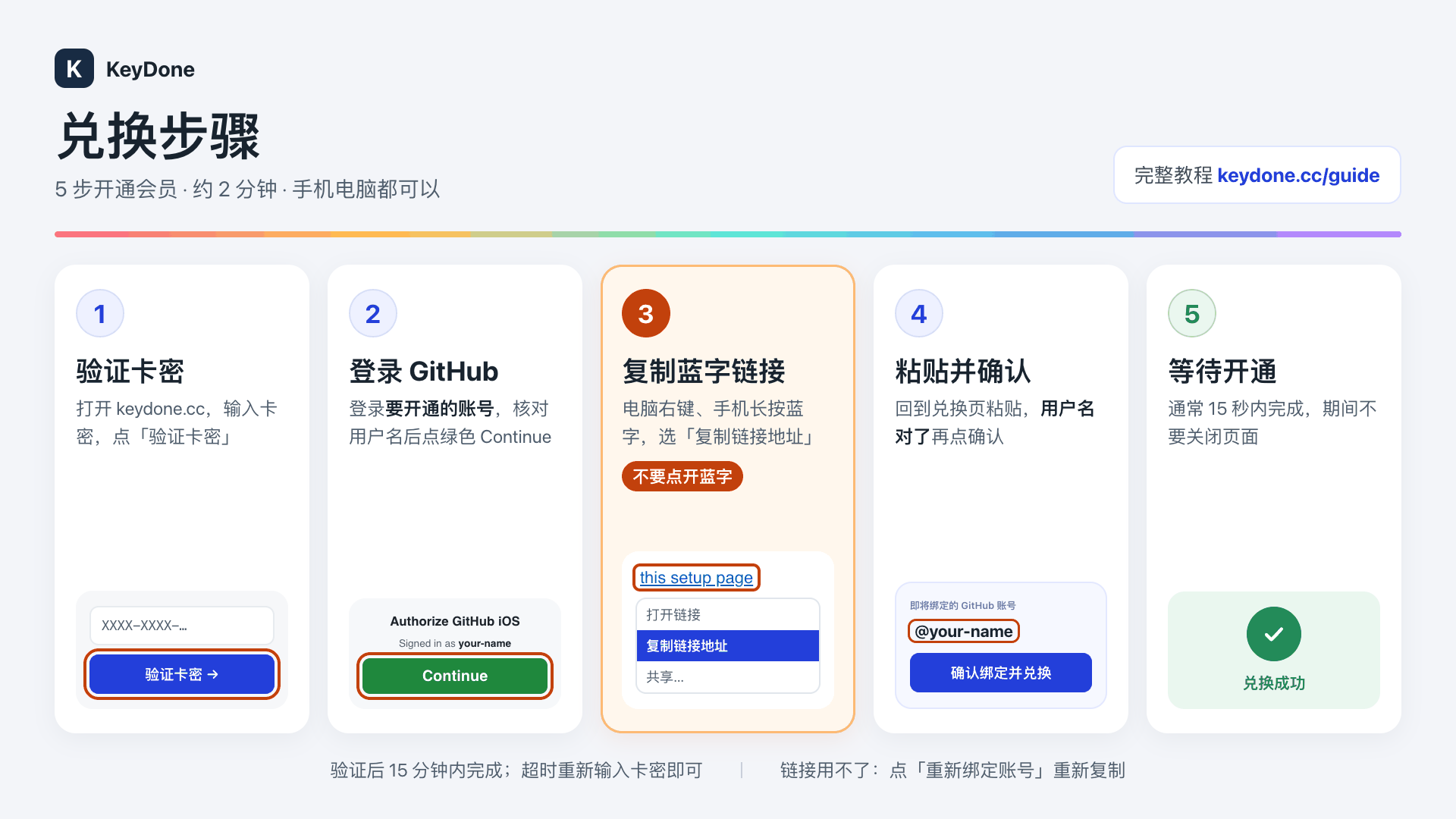
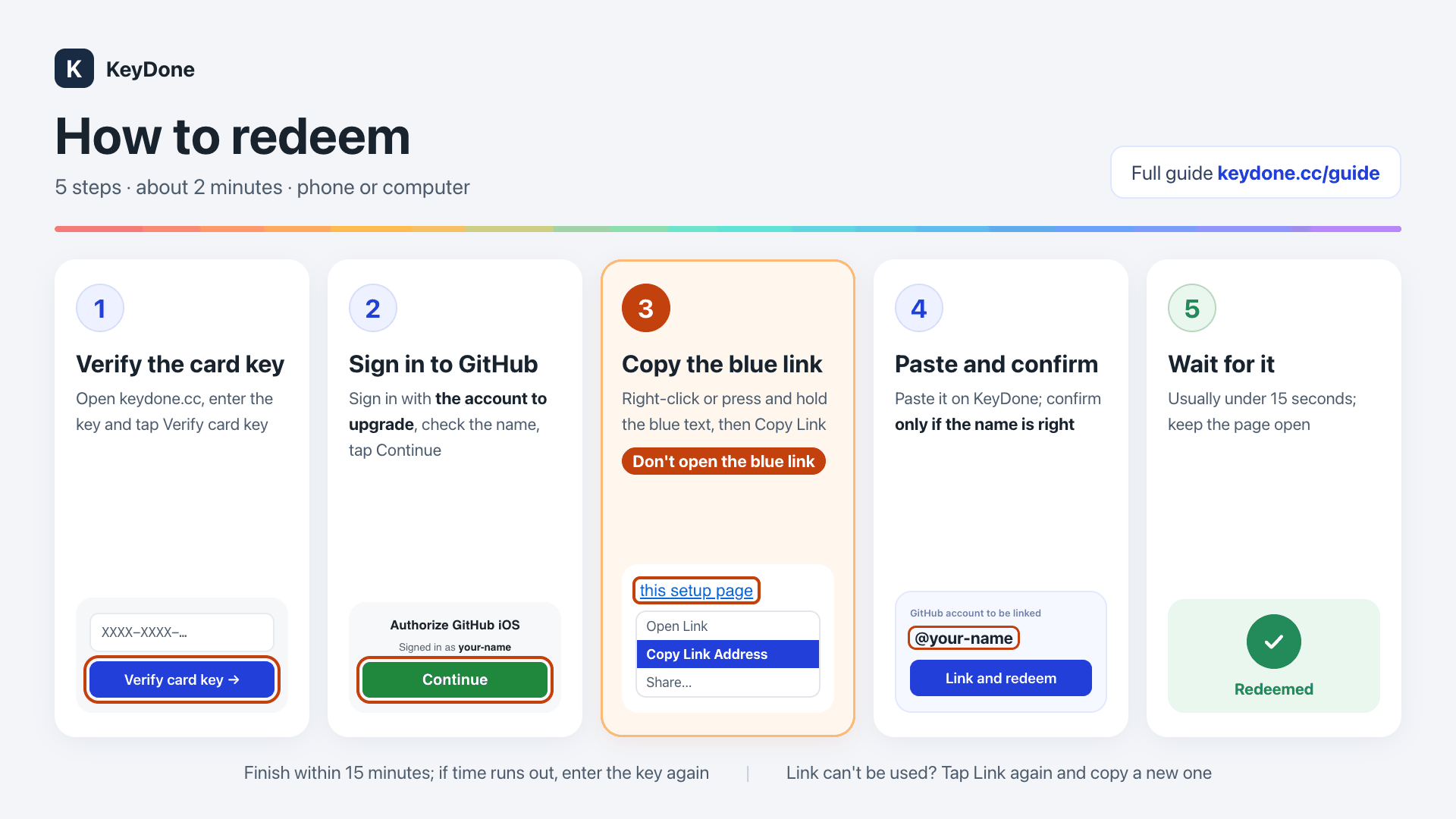
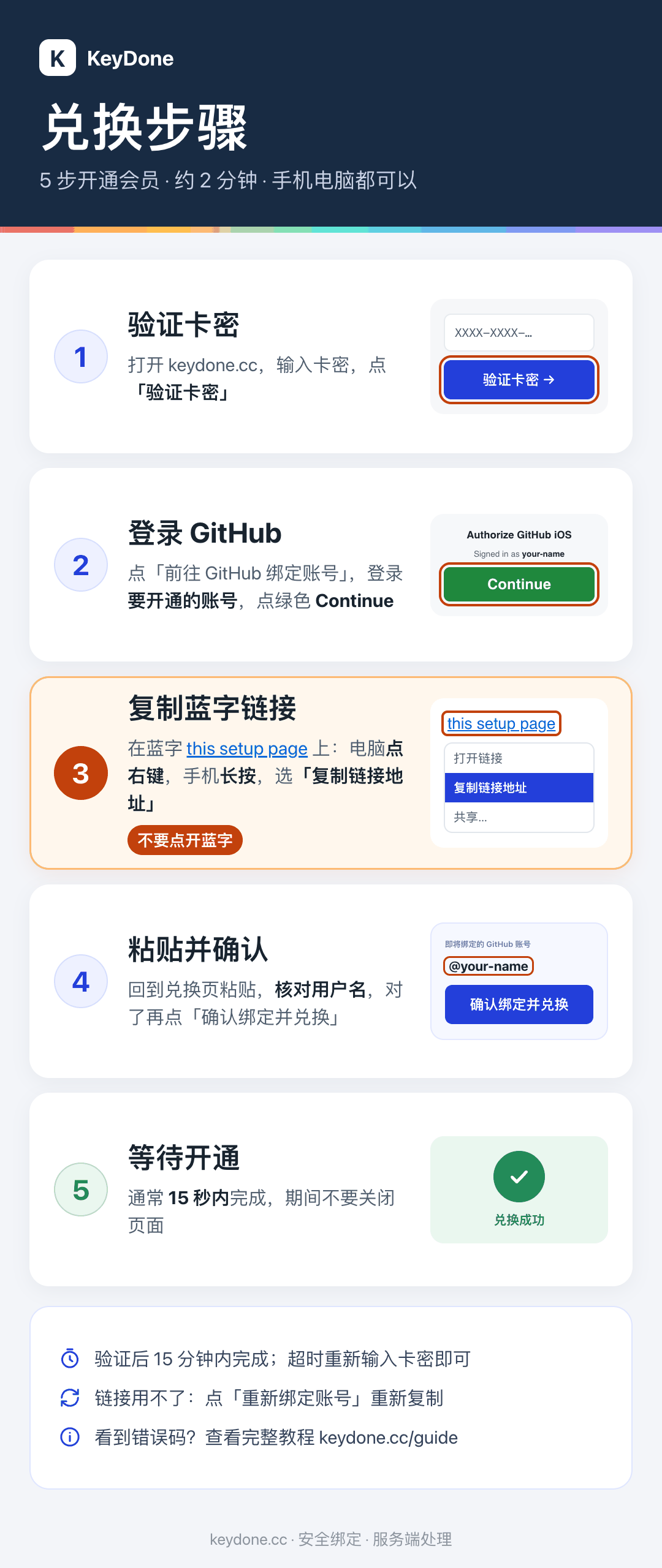
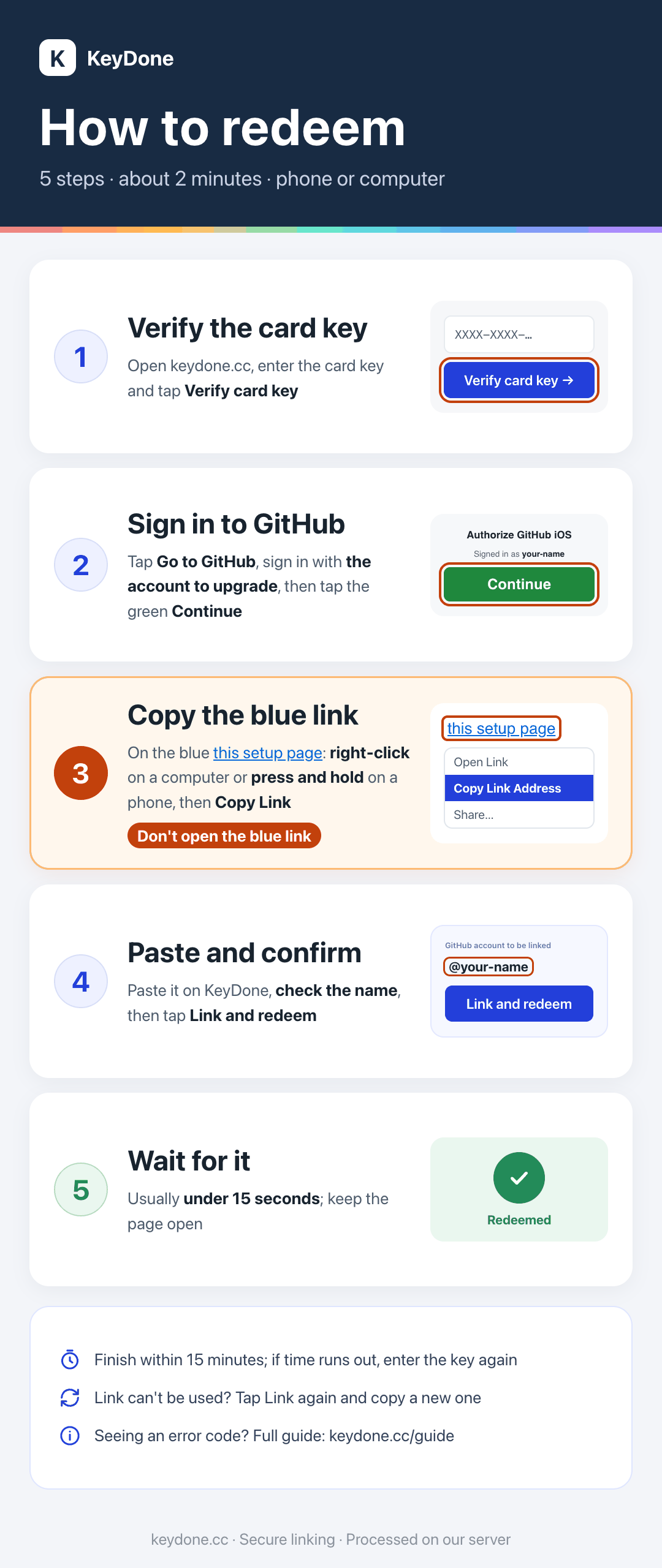
一张图看完 5 个步骤,可以保存到手机对照着操作。手机上打开图片后长按即可保存。All five steps in one picture. Save it to your phone and follow along; on a phone, open the image and press and hold to save it.
联系客服时请一起发:卡密后 4 位、页面上的错误码、出问题的大概时间。不要把完整卡密发到公开的群里。When you contact support, include the last 4 characters of the card key, the error code on the page and roughly when it happened. Don't post the full card key in a public group.